WorkLedge

A quiet record of what you actually did. Log a piece of work in seconds from anywhere in Windows, keep it on your own machine, and find it again on every computer you work from.

سجل هادئ لما أنجزته فعلًا. سجّل عملك في ثوانٍ من أي مكان في ويندوز، واحتفظ به على جهازك، وستجده على كل حاسوب تعمل عليه.

Download for Windows حمّله لويندوز
Offline دون إنترنت Works with no connection يعمل بلا اتصال
CTRL+ALT+L Log from anywhere سجّل من أي مكان
Yours ملكك Stored on your machine محفوظ على جهازك
WorkLedge

What it does

ماذا يفعل

Everything below is in the app today. Nothing here is coming soon.

كل ما يلي موجود في التطبيق اليوم. لا شيء هنا "قريبًا".

Log it in seconds

سجّل في ثوانٍ

A global shortcut opens the entry form over whatever you were doing. Type what you did, press save, carry on.

اختصار عام يفتح نموذج التسجيل فوق ما تعمل عليه. اكتب ما أنجزته، احفظ، وأكمل.

Projects and loose work

مشاريع وأعمال متفرقة

Tie an entry to a project, or log it on its own. Not every hour belongs to a project, and the app never pretends otherwise.

اربط المدخلة بمشروع، أو سجّلها وحدها. ليست كل ساعة تخص مشروعًا، والتطبيق لا يفترض العكس.

Follows you between machines

ينتقل معك بين الأجهزة

Sign in on another computer and your ledger is already there — projects, entries, tags and all.

سجّل الدخول على حاسوب آخر وستجد سجلك بانتظارك — المشاريع والمدخلات والوسوم.

Offline first

يعمل دون اتصال أولًا

Everything is written to your own machine first. Log with no connection at all; it syncs itself the next time there is one.

كل شيء يُكتب على جهازك أولًا. سجّل بلا اتصال إطلاقًا، وسيتزامن تلقائيًا عند توفره.

Reports worth reading

تقارير تستحق القراءة

Time logged over any period, where it went by project, category and tag, which days you worked and which hours you work best in.

الوقت المسجل خلال أي فترة، وأين ذهب حسب المشروع والتصنيف والوسم، وأي الأيام عملت فيها وأي الساعات أنتج لك.

Export for the invoice

تصدير للفاتورة

A timesheet, a per-project summary, a day-by-day breakdown, or a written report — over any period, for any projects.

جدول زمني، أو ملخص لكل مشروع، أو تفصيل يومي، أو تقرير مكتوب — لأي فترة ولأي مشاريع.

Behind a PIN, if you want

خلف رمز، إن أردت

Lock the app, or only the parts that matter. Off by default, because most people do not need it.

اقفل التطبيق، أو الأجزاء المهمة فقط. معطّل افتراضيًا، لأن أغلب الناس لا يحتاجونه.

Arabic and English

بالعربية والإنجليزية

Both languages throughout, laid out right-to-left or left-to-right as they should be. Light and dark themes too.

اللغتان في كل الواجهات، بتخطيط من اليمين أو من اليسار كما ينبغي. مع مظهر فاتح وداكن.

Out of the way

بعيدًا عن طريقك

Lives in the system tray and can start with Windows — quietly, without a window in your face at login.

يسكن في شريط المهام ويمكنه العمل مع بدء ويندوز — بهدوء، دون نافذة في وجهك عند الدخول.

A look inside

نظرة من الداخل

Real screens from the app, not mock-ups.

شاشات حقيقية من التطبيق، وليست تصاميم تجريبية.

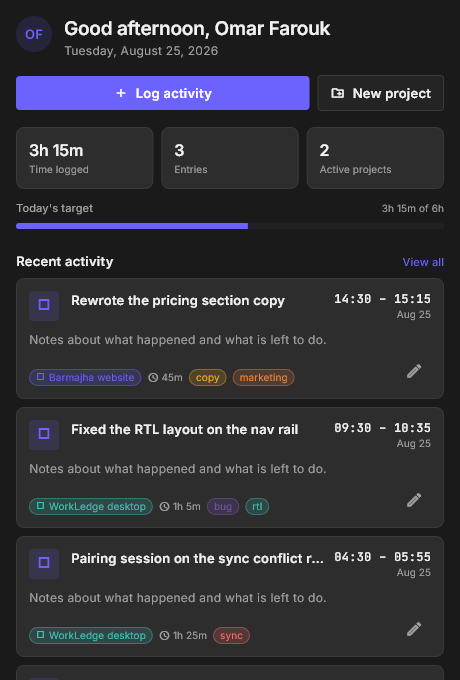
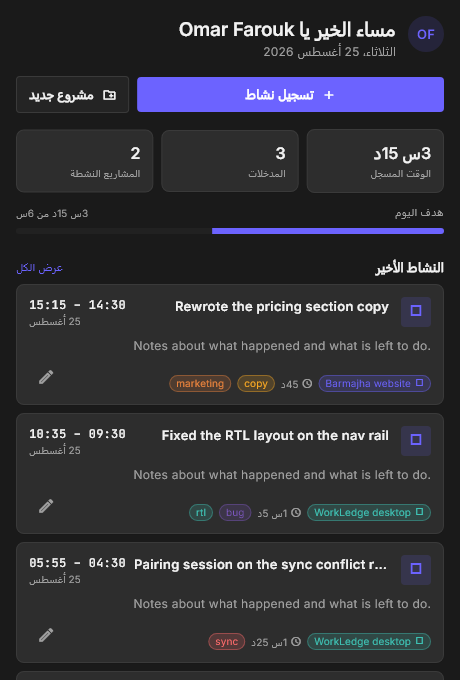
The WorkLedge home screen

Today, at a glance

يومك في لمحة

Time logged, your daily target, and what you have done so far.

الوقت المسجل، وهدفك اليومي، وما أنجزته حتى الآن.

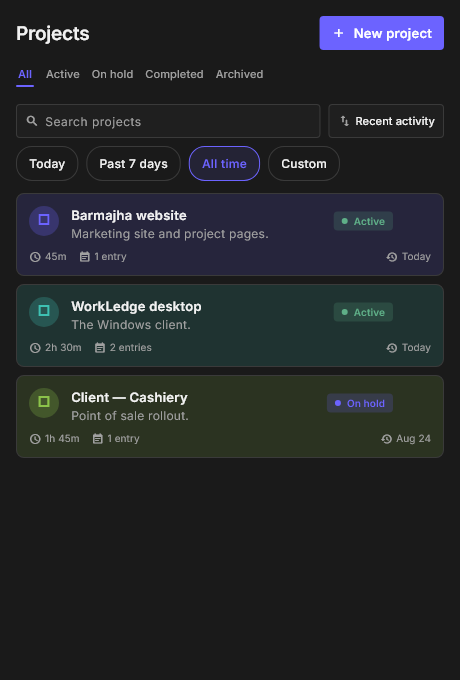
The WorkLedge projects screen

Projects

المشاريع

Every project with its own time, entry count and last activity.

كل مشروع مع وقته وعدد مدخلاته وآخر نشاط فيه.

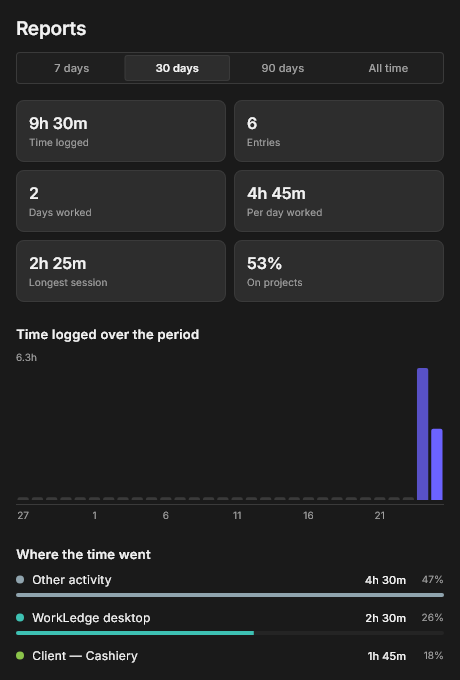
The WorkLedge reports screen

Reports

التقارير

Where the time actually went, over any period you pick.

أين ذهب الوقت فعلًا، خلال أي فترة تختارها.

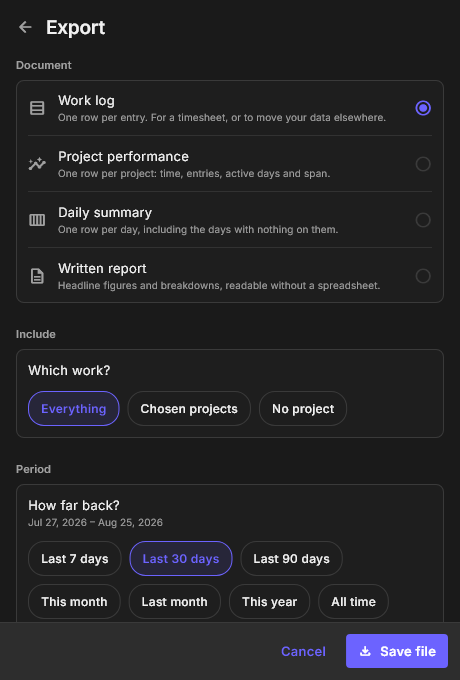
The WorkLedge export screen

Export

التصدير

Four kinds of document, filtered to the work you mean.

أربعة أنواع من المستندات، مصفّاة على العمل الذي تقصده.

WorkLedge in Arabic

In Arabic

بالعربية

The whole app, laid out right-to-left.

التطبيق كاملًا، بتخطيط من اليمين إلى اليسار.

Built for the keyboard

مصمم للوحة المفاتيح

Logging your work should cost less than the work did.

تسجيل عملك يجب أن يكلفك أقل مما كلفك العمل نفسه.

Log an activity, from any app سجّل نشاطًا، من أي تطبيق Ctrl + Alt + L
New entry, inside the app مدخلة جديدة، داخل التطبيق Ctrl + N
Jump between the four screens التنقل بين الشاشات الأربع Ctrl + 1 … 4
Close whatever is open إغلاق ما هو مفتوح Esc

Your ledger stays yours. Every entry is written to a database on your own computer first. Signing in is optional — it exists so your work can follow you to another machine, and nothing more. There are no ads, no trackers, and nothing is sold to anyone.

سجلك يبقى ملكك. كل مدخلة تُكتب أولًا في قاعدة بيانات على حاسوبك أنت. تسجيل الدخول اختياري — وُجد ليتبعك عملك إلى جهاز آخر، لا أكثر. لا إعلانات، ولا متتبعات، ولا بيع لبياناتك لأي جهة.

Try WorkLedge free

جرّب WorkLedge مجانًا

A full copy of the app, with every feature open. Windows 10 and 11, 64-bit. No account needed to start.

نسخة كاملة من التطبيق بكل مميزاته. ويندوز 10 و11، 64-بت. لا حاجة لحساب للبدء.

What you get

ما ستحصل عليه

  • Every feature, nothing held back
  • Free updates
  • Support by email and WhatsApp
  • Your data exportable at any time
  • A clean uninstall that leaves your log alone unless you say otherwise
  • كل المميزات دون استثناء
  • تحديثات مجانية
  • دعم عبر البريد وواتساب
  • بياناتك قابلة للتصدير في أي وقت
  • إلغاء تثبيت نظيف يترك سجلك كما هو ما لم تطلب غير ذلك